> ## Documentation Index
> Fetch the complete documentation index at: https://elementary-more-explicit-webhook-instructions.mintlify.site/llms.txt
> Use this file to discover all available pages before exploring further.
# Send report summary notification to Slack
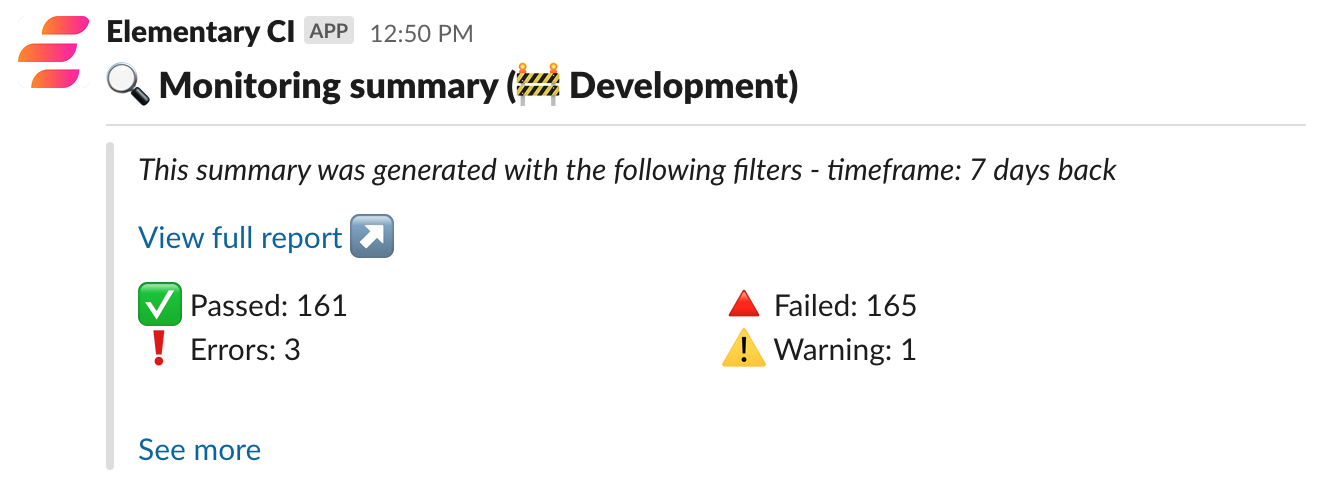
In addition to distributing the report itself, you can send a report summary notification to Slack.
This is useful for you and your team members to understand quickly if there is something in the new report you should address.
* **Share via Slack**: The summary is sent by default.
* **Hosting on S3 or GCS**: You need to provide slack token and channel to in order to enable the Slack results summary.
 ### Enabling report summary for hosted report
After you [set up a Slack app and token](/oss/deployment-and-configuration/slack#slack-integration-setup) you can run the following command:
AWS S3:
```shell
edr send-report --aws-profile-name --s3-bucket-name --slack-token --slack-channel-name --update-bucket-website true
```
GCS:
```shell
edr send-report --google-service-account-path --gcs-bucket-name --slack-token --slack-channel-name
```
A link to the hosted report is included in the summary, which can be accessed based on the permissions you have set on your hosting platform (AWS/GCS).
### Report summary configuration
#### Filter results summary
The report itself cannot be filtered by tag, owner or model! To use those
filters for the summary you need to disable the report attachment by adding
`--disable html_attachment` to your command.
You can filter your results summary by a specific tag, owner or model.
To filter by tag:
```shell send-report selectors
edr send-report --select tag:finance
edr send-report --select config.meta.owner:@jeff
edr send-report --select model:customers
edr send-report --select customers
```
### Enabling report summary for hosted report
After you [set up a Slack app and token](/oss/deployment-and-configuration/slack#slack-integration-setup) you can run the following command:
AWS S3:
```shell
edr send-report --aws-profile-name --s3-bucket-name --slack-token --slack-channel-name --update-bucket-website true
```
GCS:
```shell
edr send-report --google-service-account-path --gcs-bucket-name --slack-token --slack-channel-name
```
A link to the hosted report is included in the summary, which can be accessed based on the permissions you have set on your hosting platform (AWS/GCS).
### Report summary configuration
#### Filter results summary
The report itself cannot be filtered by tag, owner or model! To use those
filters for the summary you need to disable the report attachment by adding
`--disable html_attachment` to your command.
You can filter your results summary by a specific tag, owner or model.
To filter by tag:
```shell send-report selectors
edr send-report --select tag:finance
edr send-report --select config.meta.owner:@jeff
edr send-report --select model:customers
edr send-report --select customers
```